|
USING THE "YOUR CRAFT SITE" Agora
Cart
Our tutorials have 3 sections to help you change and
add products in your cart and manage orders. Please PRINT off ALL sections before attempting to
add your products. Read through everything first, and then give it a try!
You can access your Store
Manager at http://www.YOURWEBSITEaddress.com/storemanager.html
You will only need to use a few of the links in your store manager, the other links are all settings that have been taken care of and should not be edited by you at the risk of undoing
settings essential to your cart functions.
This is the first screen you
see when you access your Store Manager
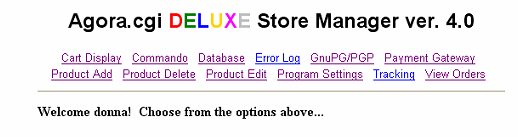
To begin you will click
on
** PRODUCT
ADD, ** PRODUCT
DELETE** OR ** PRODUCT
EDIT**
 PRODUCT
ADD, -
click to read the add product tutorial. PRODUCT
ADD, -
click to read the add product tutorial.
PRODUCT
EDIT -
click to read the edit product and learn more about drop
down option files.
PRODUCT
DELETE -
click to learn more about deleting products.
EXCHANGING
LINKS TUTORIAL-
learn about using your "Add Your Link" to
exchange links with other websites.
MAILING
LIST TUTORIAL -
learn about using your bravenet mailing list to send
newsletters to clients.
Click on a link above for the
Tutorials on each section.
Close window to return to this index page.
To check your orders and
retrieve Credit Card #'s click on the VIEW
ORDERS link.

|
