|
Your orders will arrive via
email and are also listed in your VIEW ORDERS area of your store manager
screens. You will need to log in with your Cart User ID and Cart Password to
access any order info or cart controls. For
Secure Credit Card processing, the last 8 digits of the CC # are in the email
confirmation of the order and the first 8 digits are listed in the View Orders
details in your cart. This is for security reasons and is less complicated than
encrypting your email. So to retrieve a CC order for processing manually, you
would copy the first 8 #s from your view orders details and the last 8 from the
order email you received. Unless
you have a Gateway processor enabled, you will need to process any CC orders
manually through a CC merchant terminal or an online terminal, or online
processor ( like www.propay.com ) 
Your cart can process any type of payment.
HOWEVER, it is set up to focus on Secure Credit Card payments.
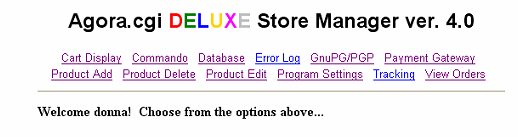
To check your orders and
retrieve Credit Card #'s click on the View
Orders link.
The log screen will come up
listing your most recent orders. We recommend Purging all orders after one week
from your log file.
(Close this window to return to
our tutorials page)

|
